

Teamgee 12″ Laptop Screen Extender, Dual Display Triple Setup, Portable Monitor for 13″–16″ Laptops, USB-C/HDMI/USB-A Plug & Play, Ideal for Remote Work & Multitasking
Original price was: $161.49.$153.41Current price is: $153.41.


Price: $161.49 - $153.41
(as of Aug 08, 2025 03:06:12 UTC – Details)
Product Description

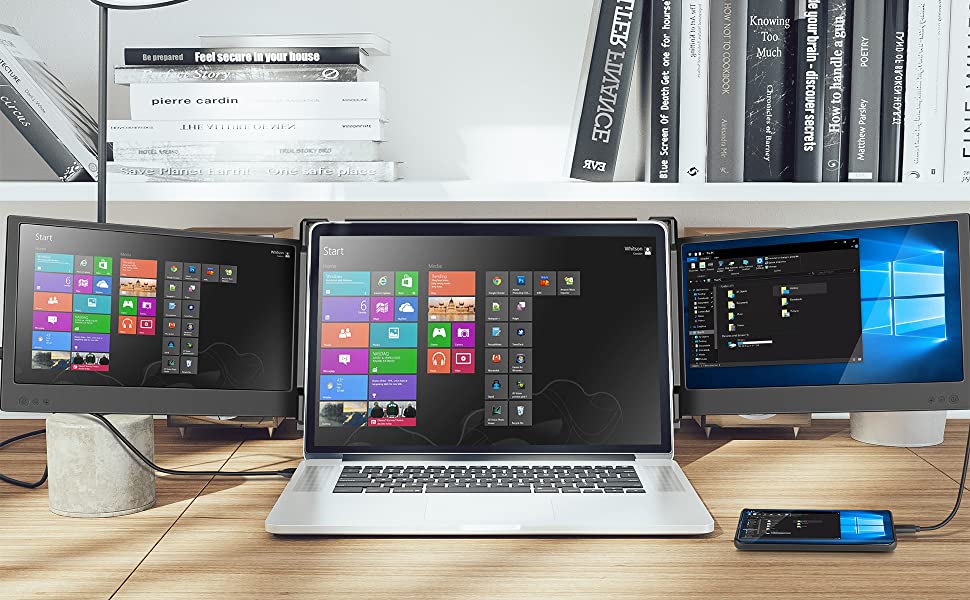

Pre-Purchase Checklist
Before purchasing, make sure your setup is compatible with our portable laptop monitor:
Operating Systems: Windows, Chrome OS, macOS (limited support for Mac M1/M2 chips)
Laptop Size: Works best with 13″-16″ laptops
Required Ports:
Option 1: Two full-function USB-C ports (recommended for optimal performance) Option 2: One full-function USB-C + One HDMI + One USB-A Option 3: Two HDMI + Two USB-A (requires docking station or hub if ports are unavailable)
MacBook Compatibility: Compatible with M1 Pro and M1 Max chips (not compatible with M1/M2 base models)
Setup Instructions
Follow these easy steps to get started:
Step 1: Identify Your Laptop Ports
Check if your laptop has two full-function USB-C ports (for data, video, and power transfer). If not, you’ll need HDMI and USB-A connections, or use a docking station/hub.
Step 2: Connect the Monitor
Scenario 1: Two Full-Function USB-C Ports AvailableUse two USB-C to USB-C cables (one per screen). Scenario 2: One USB-C + HDMI AvailableConnect one USB-C to USB-C for one screen, and HDMI to HDMI + USB-A to USB-A for the second screen. Scenario 3: HDMI + USB-A OnlyConnect one HDMI to HDMI + USB-A to USB-A per screen. Use a docking station/hub if needed.
Step 3: Adjust Display Settings
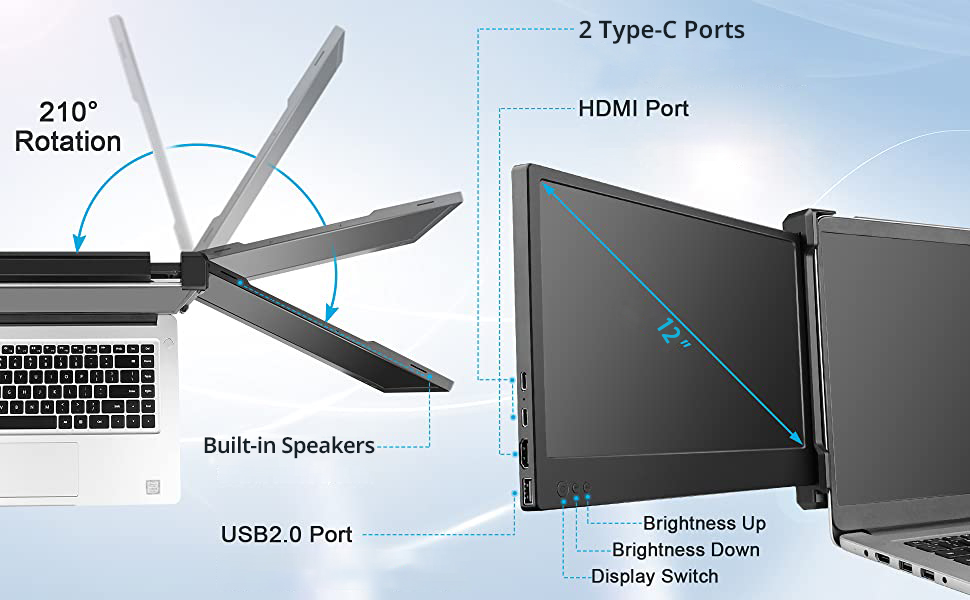
Use your laptop’s display settings to extend or mirror the screens. Adjust brightness, volume, and rotate up to 210° with the built-in controls.
Troubleshooting Guide
If you encounter any issues, try the following:
No Signal: Ensure HDMI cable is connected properly. Disconnect and reconnect, starting with USB-A, then HDMI. Dim or Low Brightness: Adjust the backlight, not just brightness. For better brightness, power the monitor externally if needed. Monitor Not Powering On: Confirm all cables are securely connected, and if using HDMI + USB-A, make sure USB-A is connected first.
Add to Cart
Add to Cart
Add to Cart
Add to Cart
Customer Reviews
4.0 out of 5 stars 26
4.3 out of 5 stars 1,474
4.4 out of 5 stars 2,319
4.4 out of 5 stars 2,319
4.3 out of 5 stars 1,474
4.3 out of 5 stars 2,378
Price
$619.99$619.99 $139.99$139.99 $104.49$104.49 $279.99$279.99 $179.99$179.99 $153.41$153.41
Screen Size
32 Inches 15.6 Inches 14 Inches 15.6 Inches 14 Inches 12 Inches
Resolution
FHD 1080p FHD 1080p FHD 1080p FHD 1080p FHD 1080p FHD 1080p
Aspect Ratio
16:9 16:9 16:9 16:9 16:9 16:9
Display Technology
LCD LCD LCD LCD LCD LCD
Refresh Rate
60 Hz 60 Hz 60 Hz 60 Hz 60 Hz 60 Hz
Screen Finish
Matte Matte Matte Glossy Matte Glossy
Mount Type
Floor Stand Desk Mount Desk Mount Desk Mount Desk Mount Desk Mount
Model Year
2024 2024 2023 2024 2023 2022
Special Feature
Touchscreen, Android 13 Slim & Lightweight, Detachable no data
Detachable no data
no data
Time-Tested & Reliable: Our longest-running dual-screen extender, trusted since 2022 for stable, straightforward multi-monitor setups
Clear Compatibility: Fits 13″–16″ laptops. Requires either two full-function USB-C ports, or one full-function USB-C + HDMI + USB-A, or two HDMI + two USB-A ports (docking station may be needed). Not compatible with MacBook Air M1/M2
Easy Setup: Plug and play — no drivers needed. For combo use, connect USB-A before HDMI. If the signal is unstable, try external power
Solid Visuals, Built-In Essentials: Dual 12″ Full HD IPS displays with 170° viewing angles — perfect for working on spreadsheets, managing documents, and multitasking. Includes built-in speakers, brightness control, and eye-care mode for long hours of use
Portable & Flexible: Lightweight enough to travel with, sturdy enough for fixed desks. Folds flat into a laptop bag and rotates up to 210° for sharing screens in meetings
Support That Stays With You: Day one or year three, real support is just an email away. Compatibility questions or setup help? We’re here to make sure it works for you
Customers say
Customers find the portable monitor easy to set up and use, with a slimline case that makes it great for travel. Moreover, they appreciate its functionality, particularly how it seamlessly integrates with MacBooks, and its versatility in accommodating multiple devices. Additionally, the display quality receives positive feedback for its crisp display and great resolution, while the build quality holds up well over time. Customers value its productivity benefits, noting it’s a game-changer for work and helps with multitasking, and find it particularly helpful for working from home.
User Reviews
Be the first to review “Teamgee 12″ Laptop Screen Extender, Dual Display Triple Setup, Portable Monitor for 13″–16″ Laptops, USB-C/HDMI/USB-A Plug & Play, Ideal for Remote Work & Multitasking”
Related Products


Original price was: $161.49.$153.41Current price is: $153.41.
There are no reviews yet.